
If you registered using an email:
-
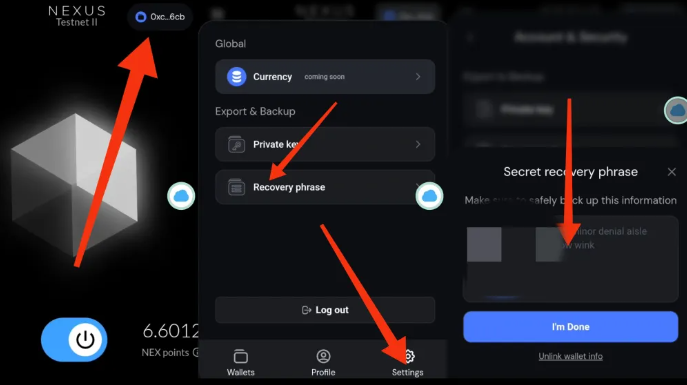
Click on the address in the top right corner
-
Click on the dropdown menu and then select “Wallet Settings”
-
Click on “Account Security”
-
Copy your private key or passphrase
-
Use your private key to import your wallet into OKX

OKX Custom Network
Network Name: Nexus
Network URL: https://rpc.nexus.xyz/http
Chain ID: 392
Symbol: NEX
Claim Test Tokens: https://hub.nexus.xyz
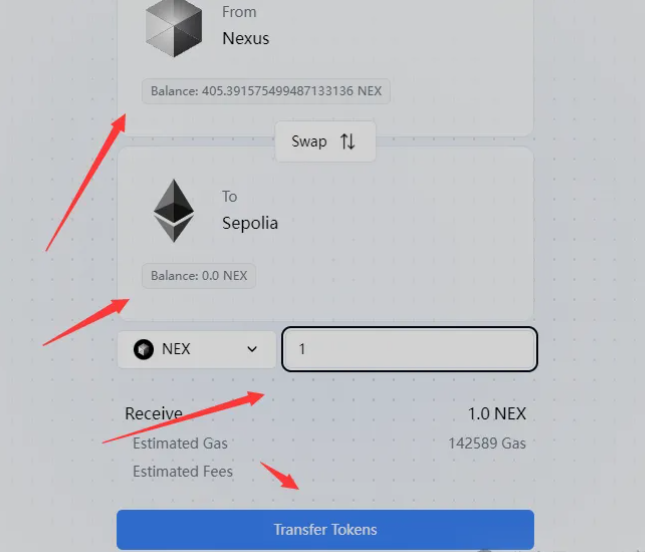
Go to the bridge page to bridge NEXUS to SPETH.
It will take about one hour. Just transfer and leave it.
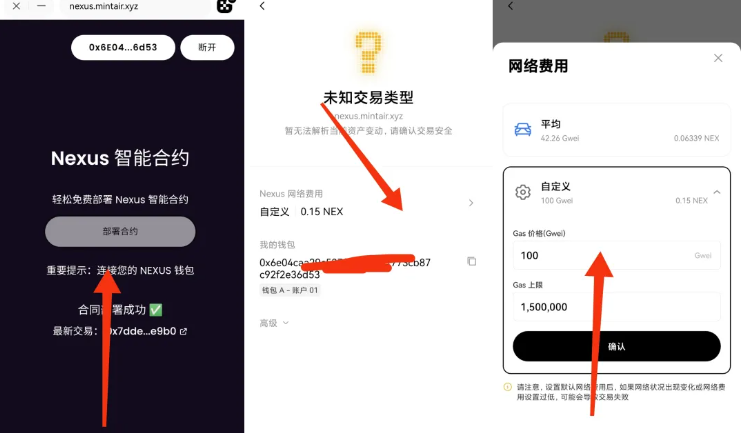
Contract Deployment. If you encounter a transaction failure, simply click on “Custom” and adjust the GAS to 50/100. Once the contract deployment is successful, you are good to go.
https://nexus.mintair.xyz/
主题测试文章,只做测试使用。发布者:Web3导航网,转转请注明出处:https://www.glodchain.com/nexus.html